
A gym bag by the door is a good start. It still helps to know what you’re doing once you get there. Physique Method brings Ronan Costa’s training programmes and practical logging tools into one app, with options for people starting out and those who already train regularly.
These are seven parts of the app worth knowing about before you choose a plan.
A session you can follow
Walk into the gym knowing what’s next
You’ve made time to train. Deciding what to do when you get there can eat into that time, especially when you’re getting back into a routine. Opening a session with the exercises already laid out gives you somewhere to begin.
Physique Method keeps your training week and session details together. Check the exercises, sets and rest periods before you start, then work through the session in the app. You can follow an available programme or build your own week around the training you want to do.
See how workouts work ↗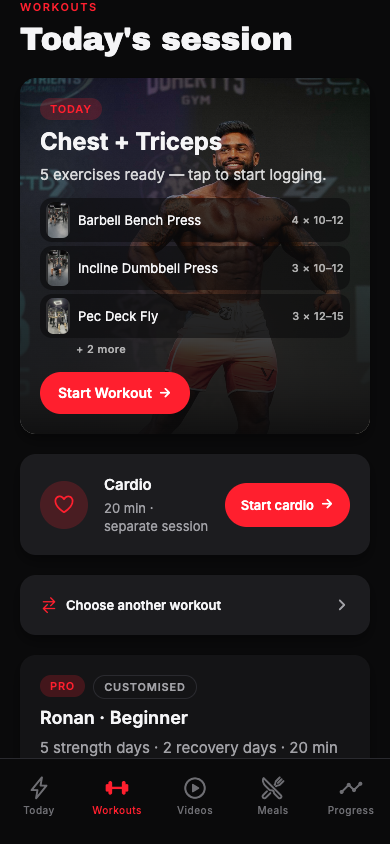
Beginner through to Advanced
Choose a programme for where you are now
Starting again after a break feels different from training regularly for years. Ronan’s Beginner, Intermediate and Advanced programmes give you three starting points to explore. Preview the exercises and weekly schedule so you know what you’re taking on.
The Beginner programme is available on Free. Pro adds Intermediate and Advanced, with more training volume and different exercise selections. Each programme repeats over a seven-day week. Choose something that fits your experience and the equipment you have, then review the details before activating it.
Explore the programmes ↗Exercise demonstrations
Watch the movement before your first set
An exercise name doesn’t always tell you enough. When a movement is unfamiliar, being able to watch it without leaving your workout is useful. Physique Method includes demonstrations with Ronan that you can open as you train.
Free includes the available demonstrations for the Beginner programme. Pro gives you access to the full exercise video library. Some programme exercises don’t yet have a matched video, so check what’s available when you preview your session.
Read the training guide ↗WATCH AN EXERCISE DEMONSTRATION
Incline dumbbell press
Press play to see Ronan demonstrate the movement. The video starts muted.
A plan you can adjust
Make room for the way you train
The cable station is busy. Your gym has a different machine. Or there’s an exercise you’d prefer to swap. A useful starting point still needs room for the decisions you make during a normal training week.
With Pro, you can customise the programme’s exercises, sets and targets in the workout editor. You can also build your own plan. Preview your changes before the session so you can get on with training when you arrive. Your completed training history stays with you when you switch programmes.
See what Pro includes ↗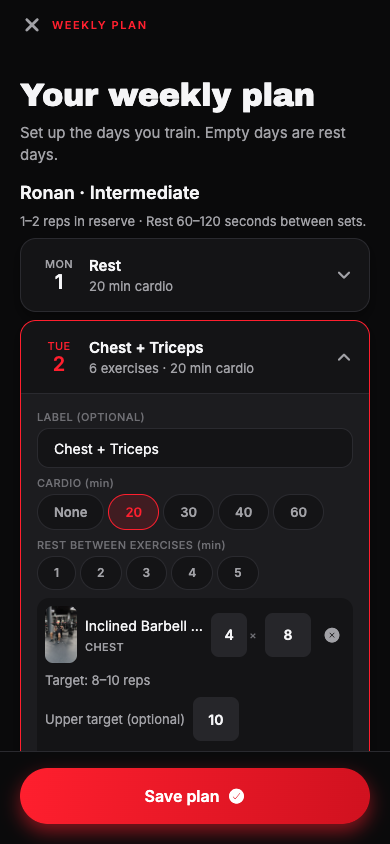
Workout logging
Remember what you actually lifted
Was that ten reps last time, or twelve? It’s easy to forget by the next session. Recording the weight and reps as you go gives you a record you can come back to, including on the days when training felt harder than expected.
Log your sets in the session and use the rest timer between them. Finish the workout to save your record. Alongside your training history, you can record weight and progress photos in Progress. Those entries let you review what you’ve done over time.
Get to know progress tracking ↗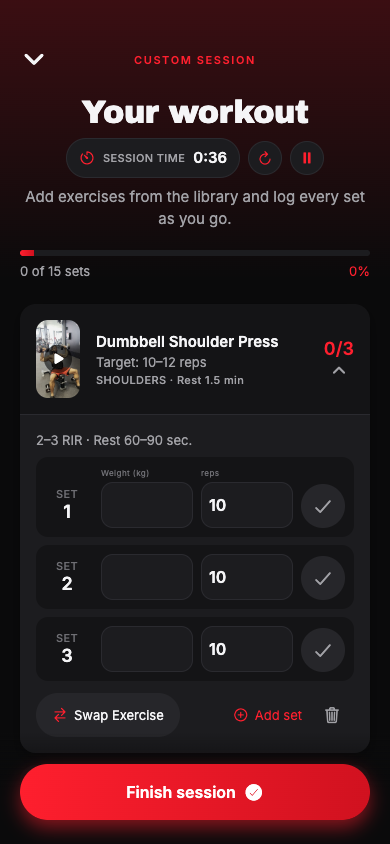
Nutrition tools with paid plans
Give your meals a bit of structure
Planning meals and remembering what you ate are separate jobs. Pro brings meal templates and calorie and macro tracking into the same app as your workouts. Water tracking is available on every plan, including Free.
Use the templates as a starting point and log the food you eat. Programme and coaching options have their own nutrition structure, so it’s worth checking the details of the plan you’re considering. You can read the meals guide before choosing an option if nutrition is your main priority.
Explore the nutrition tools ↗Six ways to use the app
Start with the level of support you need
You might want a place to log your own training. You might prefer a programme with a defined start and finish, or ongoing guidance. Physique Method gives you options for each of those approaches.
Free is a place to start. Pro adds programmes and more tools for independent training. Fat Burn is a six-week purchase, while Cutting runs for twelve weeks. Guided Training and Competition Prep provide their own training structure. Pro, Guided Training and Competition Prep are monthly subscriptions; the two fixed programmes are one-time purchases with Pro access during the programme.
You can compare everything before you choose. The app shows the current local price and purchase terms.
Compare all six plans ↗WHERE WOULD YOU LIKE TO START?
Find a method
that fits you.
Tell us your goal, your experience and how you’d like to train. Four quick questions will point you towards a plan you can explore. You can ask the team for help if you’re still deciding.
Find my methodPrefer to try it first? Download the app and start with Free.